
BetterLocale Crash
AI-powered analysis of crash and log files
by Christian Drapatz

Where monitoring ends, real developer work begins
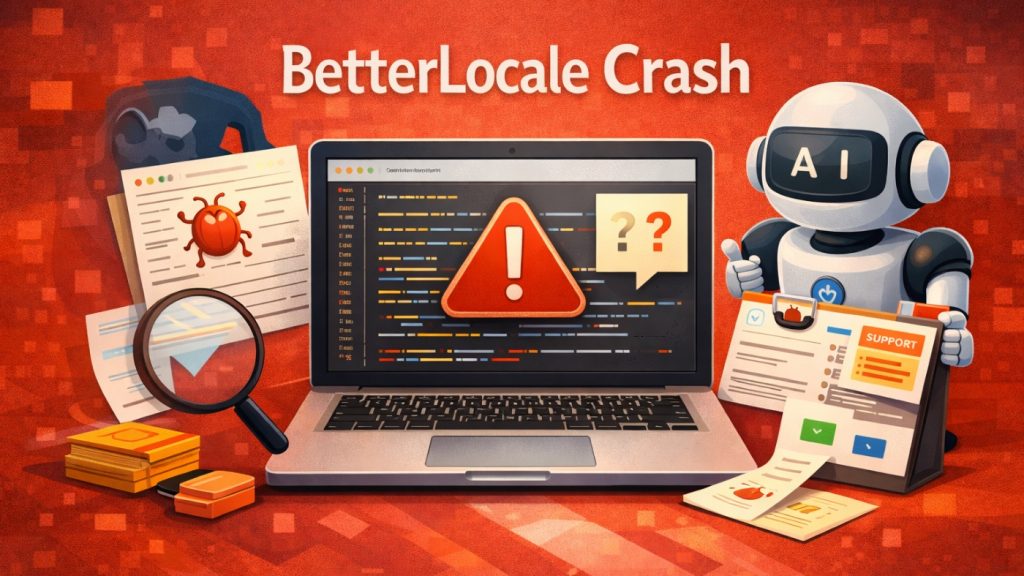
BetterLocale Crash is a macOS app for iOS and macOS developers who want to analyze crash and log files in a structured way and document them in a clear, traceable manner over time.
While traditional monitoring tools reliably report that a crash has occurred, BetterLocale Crash starts where the real work begins: understanding the root cause. The app works with reduced, comparable stack traces and makes even large volumes of crash logs easy to review and analyze.
All data is stored locally on your Mac, with no cloud requirement and no automatic data transfer. AI can be used optionally and selectively to deepen analyses, narrow down causes, or present relationships more clearly. Unlike monitoring systems, the focus is not on live monitoring, but on clean post analysis, comparison of similar issues, and transparent documentation.
BetterLocale Crash is designed for developers who do not just want to collect or archive crash logs, but want to systematically understand them, compare them, and prepare them for bug fixing, code reviews, or ticket systems – locally, in a controlled manner, and without mandatory monitoring.

Available on the Apple App Store
One click and you see how crash analysis on Mac finally becomes faster
Why BetterLocale Crash?
Klassische Monitoring- und Crash-Reporting-Tools zeigen zuverlässig, dass ein Fehler auftritt. Sie erfassen Häufigkeiten, betroffene Versionen und liefern aggregierte Statistiken, was für den laufenden Betrieb sehr wichtig ist. Wenn es jedoch darum geht, einen konkreten Crash wirklich zu verstehen, stoßen diese Werkzeuge oft an ihre Grenzen. Stacktraces bleiben roh, schwer vergleichbar und über viele Versionen oder Threads hinweg unübersichtlich.
BetterLocale Crash setzt dort an, wo die eigentliche Entwicklerarbeit beginnt. Die App hilft dabei, Crash- und Logdateien gezielt zu analysieren und auf eine stabile, reduzierte Form zu bringen. Relevante Stackframes werden extrahiert, irrelevante Informationen entfernt und ähnliche Crashes zuverlässig zusammengeführt. Dadurch lassen sich Fehler unabhängig von App-Version oder Ausführungsumgebung vergleichen.
Der Fokus liegt nicht auf Alarmierung, sondern auf Verständnis, Nachvollziehbarkeit und Dokumentation. Optional kann eine KI-gestützte Analyse genutzt werden, um Ursachen einzugrenzen und nächste Schritte abzuleiten. BetterLocale Crash ergänzt Monitoring-Tools sinnvoll, ersetzt sie aber bewusst nicht.

Do you already know the app “BetterLocale Store”?
BetterLocale Store is another tool for your development workflow. It supports you with publishing via App Store Connect and helps you maintain your app’s texts cleanly and quickly in multiple languages.
Getting Started
The editor is the central workspace of BetterLocale Crash and is deliberately designed like a classic professional editor: an overview and navigation on the left, and focused work on the selected crash on the right. This layout lets you scroll through large volumes of logs quickly without losing context, while keeping all detail features within easy reach.
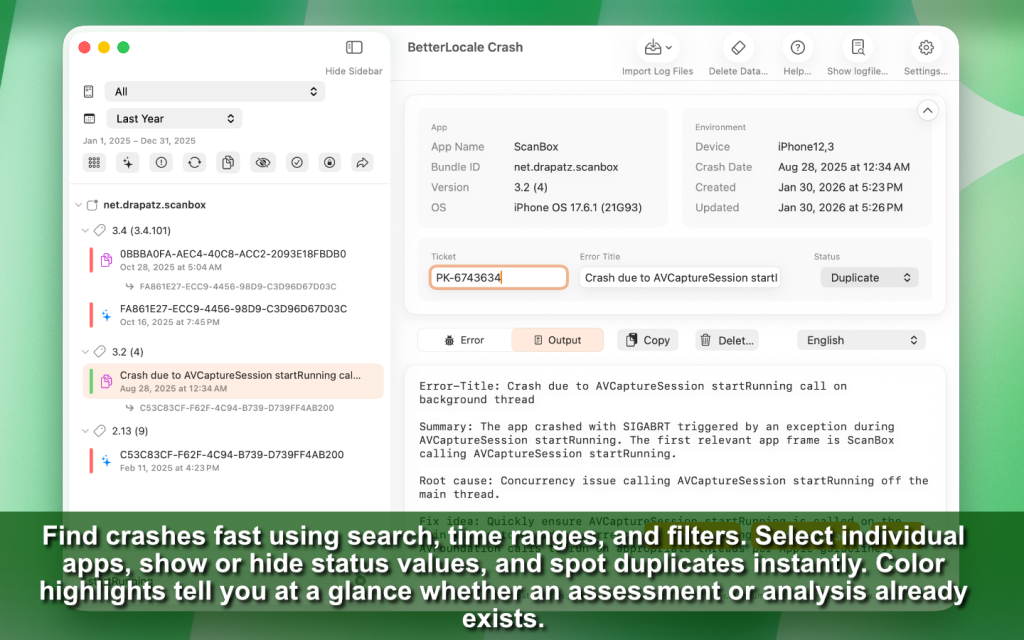
Left Pane: Overview, Selection, and Filtering
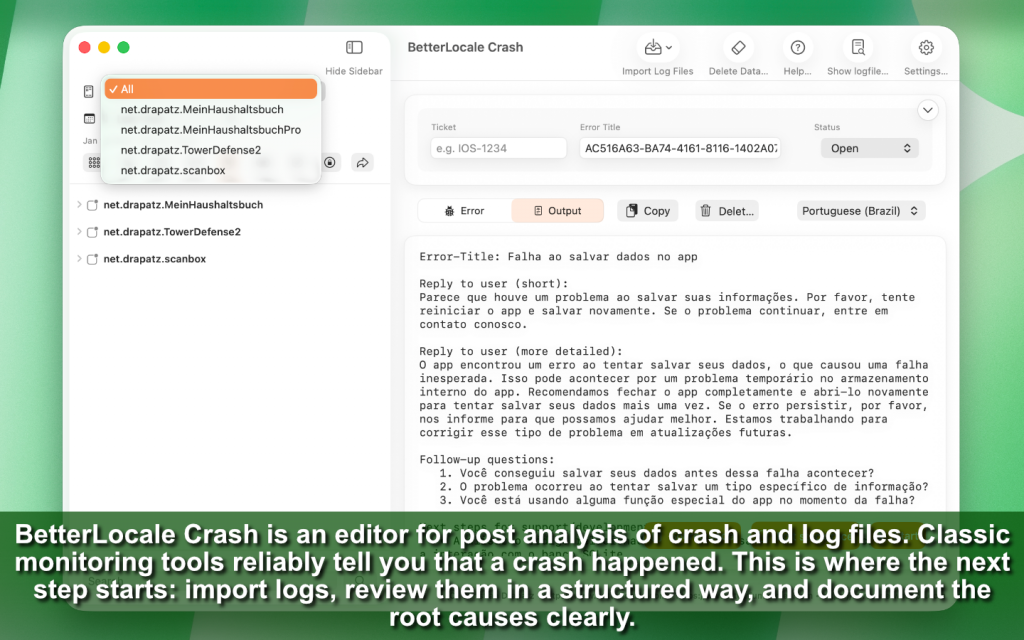
On the left side, you see all imported crash and log files organized in a clear structure by app, version, and date. This tree structure allows you to switch instantly between projects, releases, and time periods without having to create your own folders or naming conventions. You can focus on a single app or view multiple apps in parallel, for example to check whether an issue appears across different targets or product lines.
The integrated search helps you quickly find what you need by content. You can search for keywords, class names, symbols, method names, or typical error patterns from crash reports. This is especially useful when you no longer remember which version was affected but still recall how the error was described or which class kept appearing.
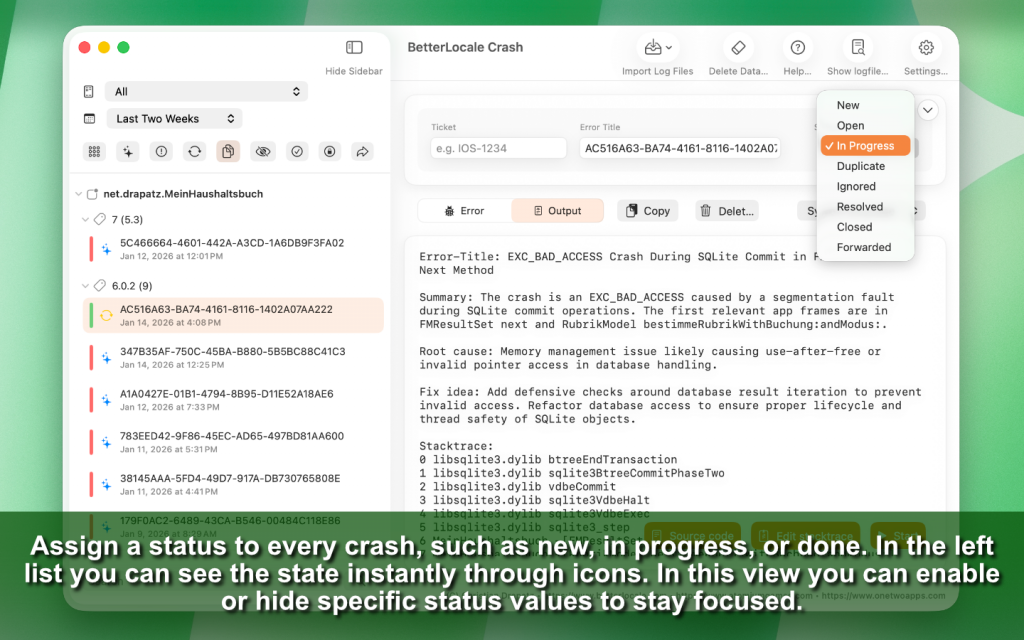
In addition, filters allow you to show or hide specific status values. This makes it easy to focus only on open items or to deliberately hide crashes that are already resolved or reviewed. A time range filter lets you narrow the view to a specific window, such as “after the last release” or “last week only,” making regressions easier to spot.
Duplicates are detected automatically and visually highlighted. This allows you to immediately see which issues are truly new and which are just variants or repetitions of the same technical problem. It reduces noise, saves time, and prevents analyzing the same crash over and over just because it occurred in a different thread or under slightly different conditions.
Right Pane: Details, Documentation, and Analysis
The right pane shows the detail view of the currently selected crash. Here, BetterLocale Crash brings together everything you need for post-analysis without requiring you to switch between windows or tools. You see the crash as a cohesive unit of metadata, stack trace, context, and your own documentation.
You can assign a custom error title—a concise, human-readable summary that is easy to recognize later and works well in tickets or team communication. You also set a status to track progress, such as new, in progress, analyzed, or resolved. This is where a raw crash file becomes a traceable work item.
For documentation, you can record assessments, root causes, notes, or ticket content directly on the crash. This is intentionally designed so you don’t have to move to a separate tool to capture insights. Everything stays linked to the crash and remains easy to find later.
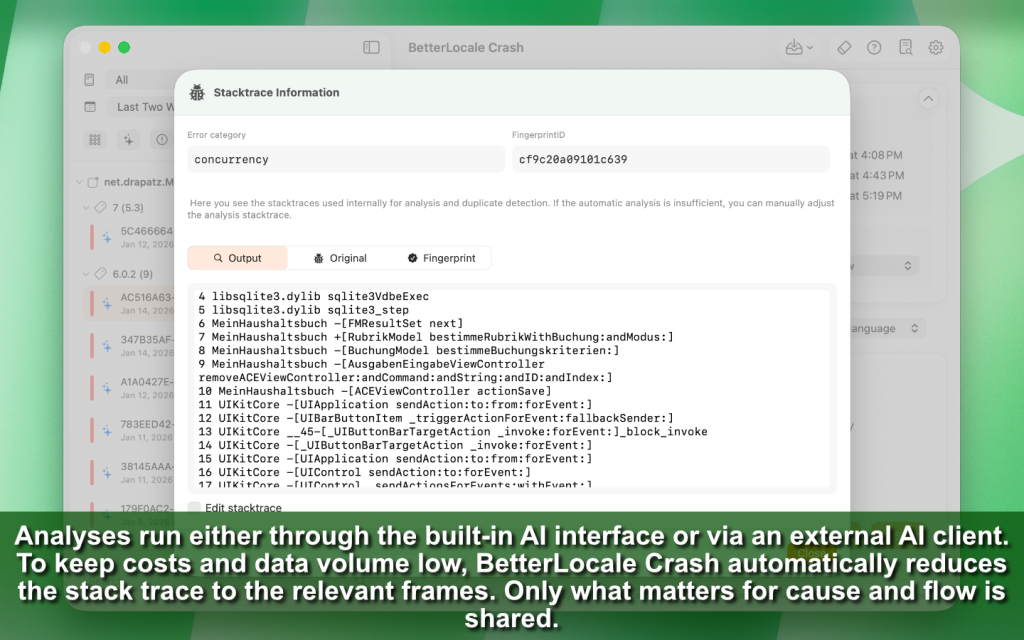
For the stack trace, the app shows both the full version and a reduced version. The reduced stack trace is meant to surface the decisive frames quickly, without drowning in system frames. This helps you identify where execution enters your code and which call chain led there. If needed, you can manually refine the stack trace by removing irrelevant frames, highlighting important sections, or adding context. This is useful when sharing an analysis or when intentionally feeding only the relevant parts into an AI analysis.
You can also attach your own source code to provide additional context. Often, a crash report alone is not enough to clearly explain why something happened. Including the affected method or relevant code block makes later interpretation much clearer. As always, you decide what to store and what you might later use for analysis.
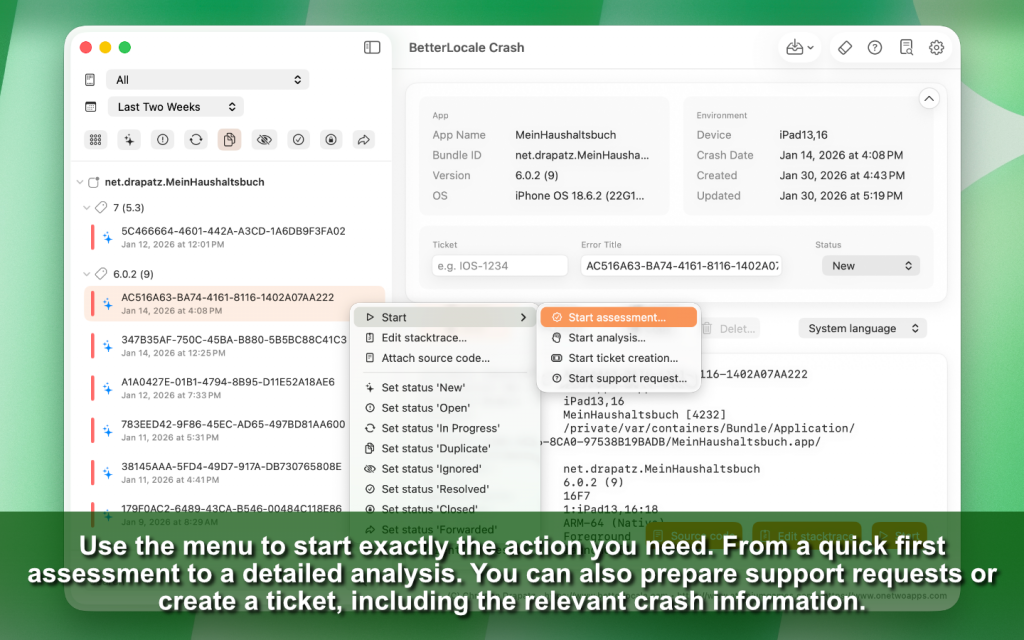
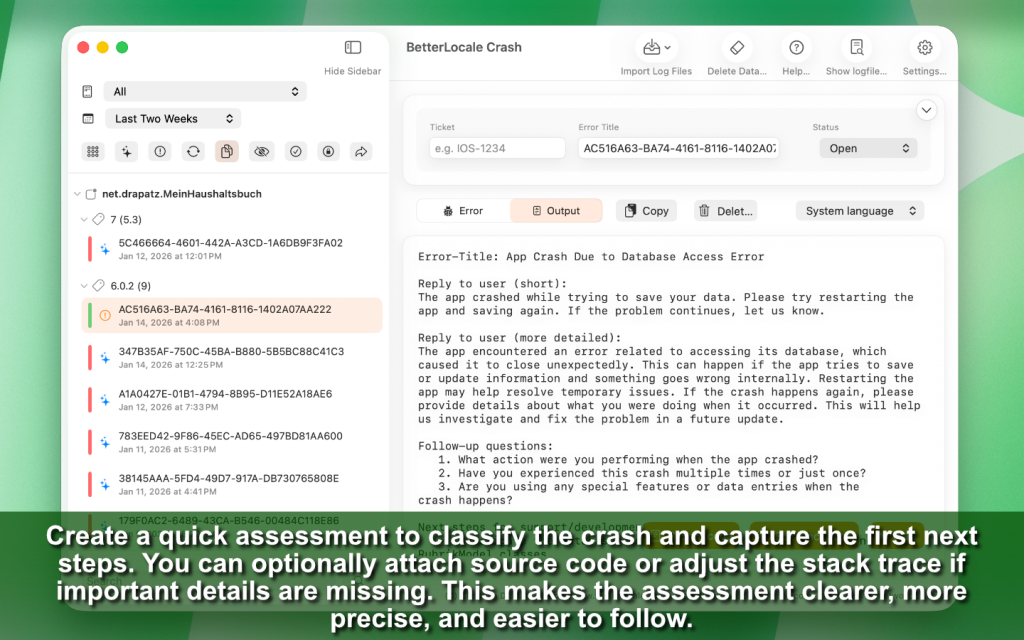
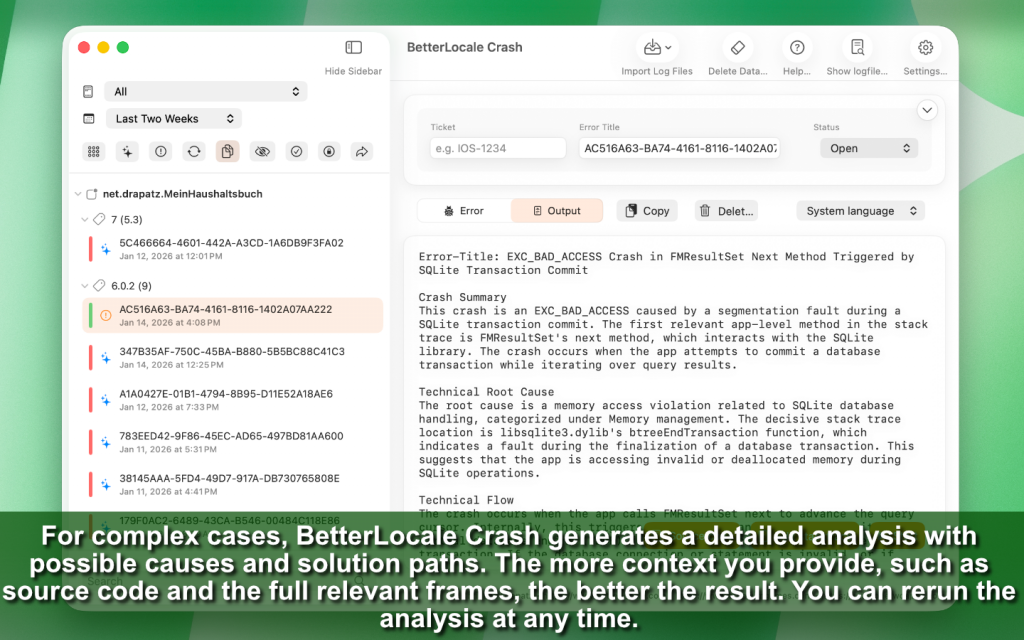
From this detail view, you can start actions depending on your needs: a brief assessment, a detailed analysis, a bug ticket, or a support response. These actions are designed to build on your curated material—the crash itself, your title, status, notes, reduced stack trace, and optional source code. Existing analyses can be adjusted or restarted at any time if new information becomes available or if you add more context later.
Overall, the editor is designed to make crash post-analysis not just fast, but sustainably traceable. You are not working “just for the moment,” but building a clean history you can reuse later for bug fixing, release checks, tickets, or team coordination.
Importing Crash and Log Files
BetterLocale Crash supports importing individual files as well as entire directories. Crash logs can be loaded directly from Xcode, the Organizer, or from archived exports. During import, the files are automatically analyzed and assigned to the correct app and version. Multiple files can be imported at the same time, including large folder structures.
Important: You can safely import the same crash files multiple times. The app reliably detects entries that already exist and does not create duplicates. This works because each crash is assigned a unique internal identifier that is generated or recognized during import. As a result, the data set remains stable even if you regularly import new exports or re-import the same folder “just to be safe.”
Duplicates are also detected and marked on a technical level. This means that even if a crash occurs in different threads, slightly different environments, or with minimally different frames, it can still be grouped as the same underlying technical issue. The goal is to prevent you from working on ten nearly identical logs and instead treat the actual root problem as a single unit.
During import, the stack trace is automatically reduced to a semantically relevant form. The full crash is preserved, but for comparison and analysis a “stable” stack trace is derived that focuses on the key entry points. Irrelevant frames, noise, and purely system-related parts are pushed into the background. This makes crashes more comparable across app versions and helps you reach the relevant sections more quickly.
The reduced stack trace is not a fixed result. You can refine it manually by removing or adding frames, weighting certain sections, or highlighting important areas if you know that specific parts are particularly relevant for your case. This allows you to further improve comparability or sharpen an analysis for a specific purpose.
The entire import process runs locally and does not require an internet connection. Corrupted or incomplete files are detected and marked accordingly, so you can immediately see when an import is not usable. After import, all entries are instantly available in the editor, including structure, duplicate markers, and both the full and reduced stack trace. This also makes the app well suited for cleaning up and documenting older crash archives in a structured and sustainable way.
BetterLocale Crash can optionally use external AI services to classify crash logs more quickly and speed up post-analysis. Using AI is never mandatory. You can use the app entirely without AI at any time and still import, structure, compare, and manually document all crash data.
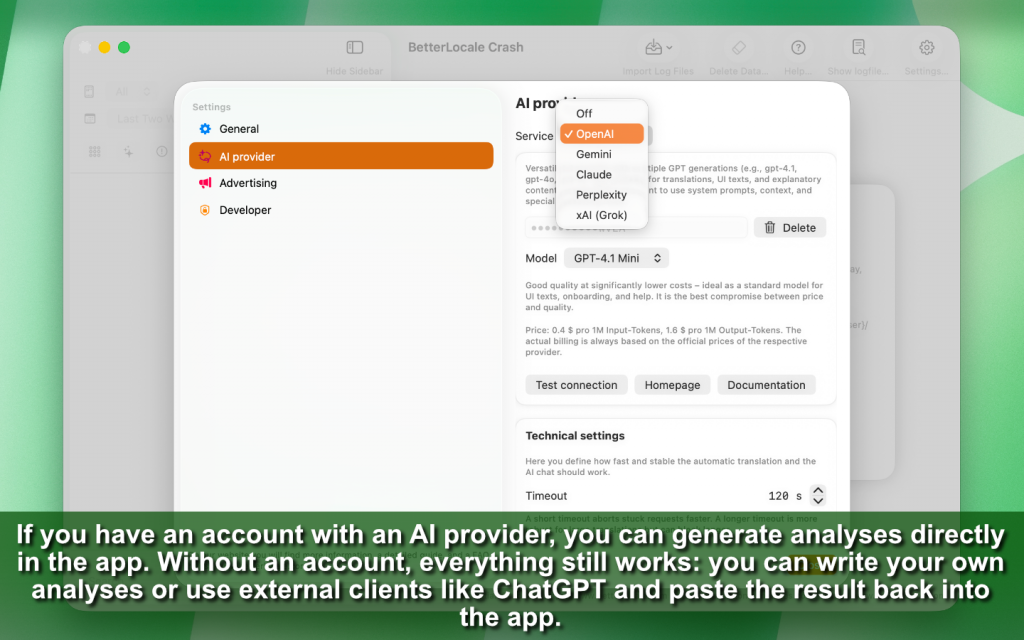
If you choose to use AI, BetterLocale Crash currently supports OpenAI, Google Gemini, Anthropic Claude, Perplexity AI, xAI Grok, and DeepL. Depending on your workflow, AI can be used to generate different types of results, such as a short initial assessment, a detailed technical analysis, a bug ticket for your tracking system, or a support text that you can reuse directly.
The core principle is always the same: the AI does not work “blindly” with the entire crash report, but only with the parts that are relevant to the specific question. Typically, the first step is to identify the key entry points in the stack trace, meaning the frames where your code or a specific module enters the failure chain. Based on this, the AI can explain the technical flow in a clear way, point out typical causes, and suggest concrete next steps, such as which areas of the code to review, which logs might be missing, or which tests could help make the crash reproducible.
Optionally, you can include your own source code if this makes the analysis more precise. This is especially useful when you want to provide a suspicious method, a ViewModel, a database query, or concurrency-related code directly. In that case, the AI can not only interpret the stack trace but also take your actual implementation into account.
What matters most is this: BetterLocale Crash does not send entire projects, complete data sets, or anything automatically. The AI only receives the content that you explicitly choose to share. You decide whether to send only the reduced stack trace, add additional context information, or deliberately leave out certain parts. This ensures that control over privacy and content always remains with you.
If you do not want to use your own account or an API key with a provider, you can still benefit from AI support. BetterLocale Crash can generate a structured analysis prompt that you can run in any external AI client, such as ChatGPT. You then manually copy the result back into the app and save it as an analysis, ticket, or note. Here as well, you decide exactly what you copy and what you do not.
In short, AI in BetterLocale Crash is an optional helper that can speed up your workflow, but it is not a requirement. You always remain in full control over whether AI is used and which content is sent to a provider.
Create an AI API key and add it to the app
To use automatic analyses or the AI chat in BetterLocale Crash, you need an API key from an AI provider.
An API key is essentially your personal access code. It allows the provider to recognize that requests come from you, associate them with your account, and bill usage exclusively to your account. BetterLocale Crash does not provide demo or test API keys and does not require you to sign in to any external service.
When you add an API key, it is stored only locally on your Mac. The key is saved in encrypted form in the macOS Keychain. The app provider has no access to your key and cannot read it. You can remove or replace the key at any time in the settings.
Important: Without an API key, BetterLocale Crash remains fully usable. You can import, organize, filter, detect duplicates, and manually document crash and log files. Only AI-related features such as automatic analysis and the AI chat are disabled.
The setup process is very similar for all providers.
What you should know beforehand
• API key = access code: You enter it in the app so it can send requests to the provider on your behalf.
• Costs are billed to you: The app sends requests, but billing happens directly through your provider account.
• Billing is often required: Many providers only allow API requests once a payment method is set up. Without billing, you may encounter errors or very low usage limits.
Quick start: get set up in 5 steps
1. Create an account or sign in
Go to your provider’s website and log in.
2. Create an API key
Look for a section such as API, Developer, Dashboard, or API Keys and create a new key.
3. Copy and store the key securely
Copy the key immediately and store it safely, ideally in a password manager.
Important: Many providers show the full key only once.
4. Enable billing / payment
Add a payment method or enable billing. Otherwise, API requests may not work or may be severely limited.
5. Enter the key in the app
Open the app → Settings → AI Providers → select a provider → paste the API key → Save
After that, you can start using AI-based features and the AI chat.
Provider guides (with direct links)
OpenAI (ChatGPT / OpenAI API)
1. Open the OpenAI dashboard:
https://platform.openai.com/
2. Create an API key:
https://platform.openai.com/settings/organization/api-keys
3. Set up billing / payment method:
https://platform.openai.com/settings/organization/billing/payment-methods
Tip: The full key is usually shown only once; afterward, it is partially hidden.
Claude (Anthropic)
1. Open the Claude console:
https://platform.claude.com/
2. Go to Account Settings in the console and create an API key.
3. Enable billing in the console so you can use the API.
Note: This previously ran partly via console.anthropic.com and is now redirected to platform.claude.com.
Gemini (Google)
1. Open Google AI Studio (API keys):
https://aistudio.google.com/app/apikey
2. If you do not yet have a project, AI Studio often creates a default project automatically. Otherwise, select or import a Google Cloud project.
3. Create and copy the API key.
Gemini API key documentation:
https://ai.google.dev/gemini-api/docs/api-key
Perplexity AI
1. Open account settings:
https://www.perplexity.ai/account
2. In the settings, open the </> API tab and generate a key (“Generate API Key”).
3. Alternatively, use the API portal (depending on the UI):
https://www.perplexity.ai/account/api
Optional: API Groups can be useful if you want to separate keys (for example “Dev” and “Prod”).
xAI Grok
1. Open the xAI account or developer area:
https://x.ai/
2. In the developer/API section, create and copy a new API key.
3. Enable billing or payment if required so API requests are not blocked.
Note: The exact location of the API key page may change depending on the xAI UI. Look for “API,” “Developers,” or “API Keys.”
Notes on costs and privacy
• Using AI APIs is usually paid and billed directly through your provider account, typically based on text volume (tokens).
• The app only sends the content you select (for example, the texts to analyze or translate) along with your instruction to the provider.
• Your API key is stored only locally on your Mac in the Keychain and is not shared with third parties.
Security
Treat your API key like a password:
• Do not share it and do not commit it to public repositories.
• If you believe the key has been compromised, disable it in the provider dashboard and create a new one.
• If you use multiple devices or projects, consider using a separate key per device or project so you can revoke access selectively without breaking everything.
Additional features
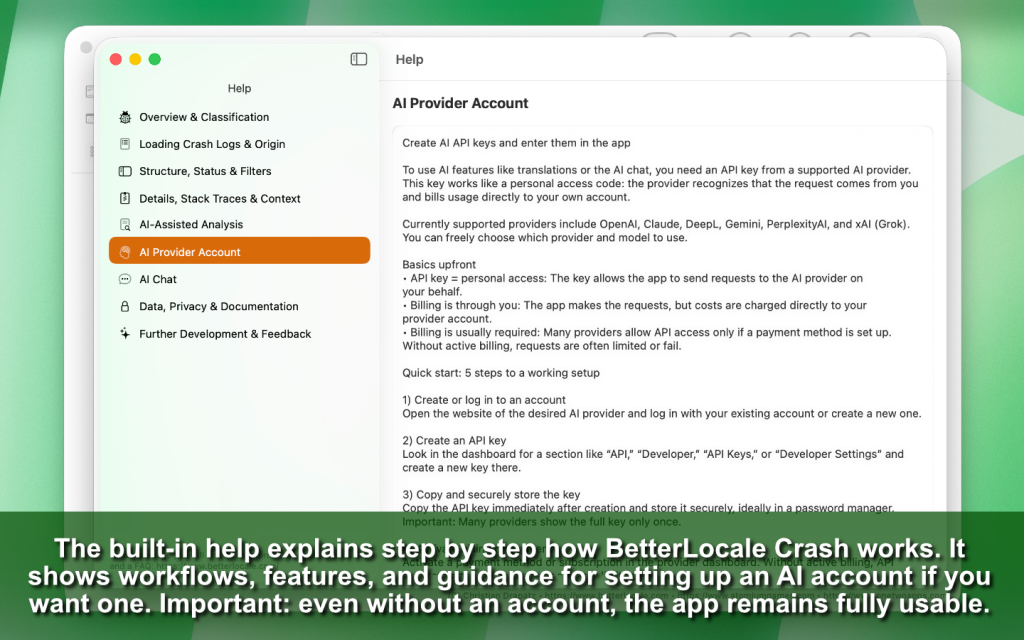
BetterLocale Crash includes an integrated help system that guides you step by step through the app, without requiring any external documentation. It starts by explaining the basic structure of the interface, showing how the editor is divided into the left navigation area and the right detail area, and how both parts work together.
The help describes the typical crash post-analysis workflow from start to finish. This includes how to import crash and log files, how the app automatically organizes them by app and version, and how to quickly navigate large volumes of logs afterward. It also explains what happens after the import, such as how to select a crash, identify the most important entry points in the stack trace, and turn that into clear, structured documentation.
All core editor features are explained in detail. For example, the help shows how search, filters, and time ranges work, how to use status values, and why this is useful in daily work to clearly separate open, reviewed, and resolved crashes. It also explains how duplicates are detected, what is considered “the same” crash, and why you can safely import the same crash files multiple times without inflating your data set.
A dedicated section covers stack trace processing. It explains why BetterLocale Crash reduces stack traces during import, which parts are typically irrelevant, and how you can edit the reduced stack trace later if you need more context for your analysis or want to keep specific frames.
Documentation in the detail view is also fully covered. The help shows where to maintain titles, assessments, root causes, and notes, how to add source code for additional context, and how to integrate results such as evaluations, analyses, tickets, or support texts into your workflow. It also explains how and why you might restart an analysis, for example when new information becomes available or additional context is added later.
The optional use of AI is explained clearly without presenting it as a requirement. The help describes the three supported workflows: working completely manually without AI, using AI via an external client through the clipboard, or using AI directly inside the app with your own provider account. It also clarifies which data is transferred in each case and emphasizes that you always decide what to share.
The help is designed for both beginners and experienced developers. New users get a clear introduction and guidance for their first import, while advanced users can jump directly to focused chapters on duplicates, filters, stack trace reduction, documentation structure, and AI workflows. The help is accessible directly from within the app at any time, allowing you to look things up quickly without losing context.
This way, you can use BetterLocale Crash effectively even if you only open the app occasionally or return to it after a longer break.
BetterLocale Crash provides an integrated way to send feedback without requiring email clients, websites, or external forms. You can report ideas, improvement suggestions, concrete issues, or small UX friction points directly from within the app, exactly when you notice them.
The feedback area is designed to help you get straight to the point. You can describe what you observed, what you would like to see improved, and in which context it occurred. If you are reporting a bug, you can also specify which view is affected, which steps you took, and what you expected to happen. The more precise the feedback, the easier it is to reproduce and fix the issue properly later on.
What’s important: there is no automatic background data collection and no hidden data transfer. BetterLocale Crash does not silently send logs, crash data, or projects anywhere. For each feedback submission, you decide exactly which information you want to share and which you don’t. If you prefer not to include crash reports, stack traces, or screenshots, you can simply leave them out. The app remains fully functional regardless.
The feedback channel is optional and not required to use the app. You can run BetterLocale Crash completely offline and keep all documentation local. Sending feedback is always a deliberate action and remains transparent.
From a product perspective, feedback is used to continuously improve the app. Ideas feed into new features, recurring issues help with prioritization, and concrete bug reports improve stability and quality. In short: you decide what you share, and nothing happens in the background without your consent.
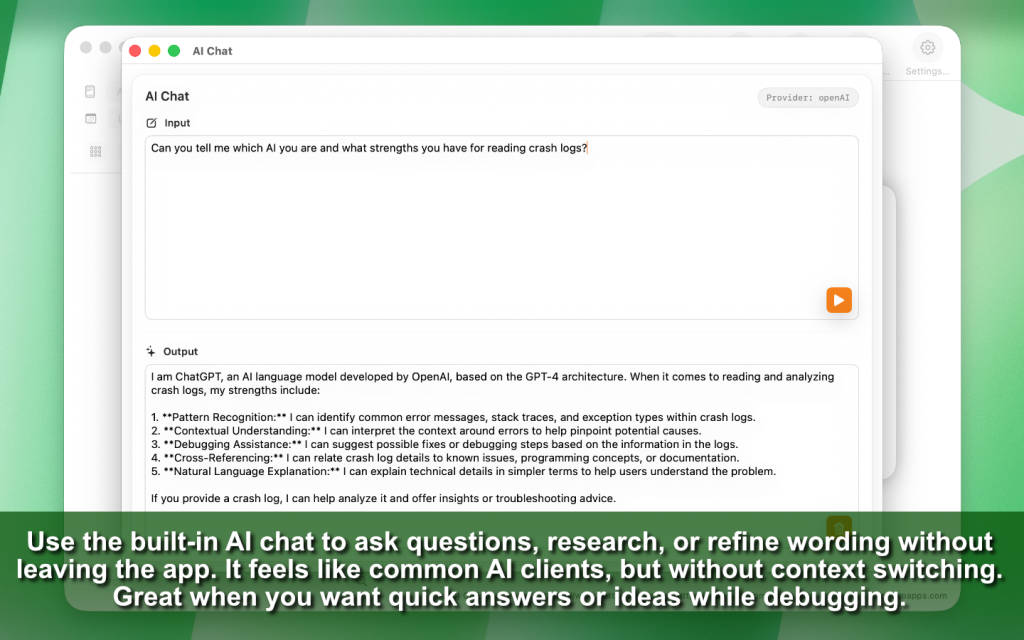
In addition, BetterLocale Crash offers an optional AI chat that you can open directly within the app. It is designed as a supplement for situations where you want to quickly look something up or clarify a technical question while analyzing a crash, without leaving the app.
The AI chat is intended for users who already have their own API key with a supported provider. BetterLocale Crash does not provide a test user or demo key. The chat is only visible and available if a valid API key is configured in the settings. Without a key, the feature remains disabled to avoid confusion during review or in everyday use.
In practice, the chat feels similar to a typical AI client. You can freely ask questions, for example about a stack trace, common causes of certain crash types, iOS or macOS runtime behavior, or framework-specific characteristics. The chat is also useful for explaining concepts, classifying error patterns, or collecting ideas for next debugging steps. It is primarily a research and understanding tool rather than part of the core data capture workflow.
Technically, the chat calls the provider’s API directly. For this reason, it is not available in offline mode. If there is no network connection or the provider is unreachable, the chat cannot return responses. Even in this case, BetterLocale Crash remains fully usable, as the core workflow is independent of the AI chat.
For clarity: the AI chat is optional and not part of the core workflow. The main purpose of the app is importing, structuring, and documenting crash and log files. The chat can help you understand issues more quickly or phrase analyses more clearly, but it is not required to use the app effectively.
Have you already tried the OneTwoApps apps for iPhone and iPad?


ScanBox

My BudgetBook

My BudgetBook Pro
Pricing and Premium
BetterLocale Crash is offered primarily as a subscription so the app can be maintained, improved, and operated reliably long term. The subscription funds new features, noticeable day to day improvements, continuous bug fixes, and regular updates.
A special focus is the ongoing expansion of the AI integration. Support for additional providers and new analysis workflows is added step by step and becomes available automatically during the subscription period.
Alternatively, BetterLocale Crash offers a one time in app purchase that unlocks the app fully and permanently. With this lifetime purchase, no subscription is required. All currently available features are fully accessible with no recurring costs.
Both the subscription and the lifetime purchase include the full feature set. Purchases are completed directly in the app. Subscriptions can be managed or canceled at any time via the App Store, and the relevant section can also be opened directly from within the app.
Full Access 1 Month
All features unlocked for 1 month.
That is EUR 3.99 per month.
Full Access 2 Months
All features unlocked for 2 months.
That is EUR 3.49 per month.
Full Access 3 Months
All features unlocked for 3 months.
That is EUR 3.33 per month.
Full Access 6 Months
All features unlocked for 6 months.
That is EUR 2,83 € per month.
Full Access 12 Month
All features unlocked for 12 months.
That is EUR 2.08 € per month.
Lifetime
All features are unlocked forever.
That is, for example, EUR 1.25 for 2 years.
Privacy
BetterLocale Crash stores all projects, crash logs, and analyses exclusively locally on your Mac. Data is only transmitted externally if you choose to use optional AI features. In that case, only the content you explicitly select is sent together with your request to the AI provider you chose. API keys are stored locally in the macOS Keychain only. BetterLocale does not store or process any API keys or content on its own servers.
For more details, see the full privacy policy.
Have you checked out the games from AtomiumGames yet?


Crazy Monsters

Tower Arena: Time for heroes

Strategy War: Battle Game

Battle Alliance: Tower Defense
FAQ
Here you’ll find the most important questions about BetterLocale Crash, along with a few practical tips from everyday development work.
Is BetterLocale Crash a monitoring tool like Sentry or Firebase?
The app does not collect live data, does not monitor apps in the background, and does not automatically send crash reports. There is no SDK integration in your apps, no event streams, no web console, and no ongoing telemetry.
Monitoring tools mainly answer questions like: How often does a crash occur? Which users are affected? Which devices and app versions are involved? And since when has it been happening? BetterLocale Crash starts where you already have crash files and want to truly understand them. It focuses on post-analysis, comparison, structure, duplicates, status tracking, notes, ticket preparation, and traceable documentation across time and versions.
If you already use Sentry, Firebase, or similar tools, BetterLocale Crash is not a replacement but a complementary tool for the part that often takes the most time in practice: clearly identifying root causes and documenting them in a sustainable way.
Where do the crash logs come from?
Apple collects crash reports centrally and makes them available to developers through Xcode as soon as they are available and symbolicated. Depending on your project and setup, you may obtain crash files from the Xcode Organizer, App Store Connect exports, or archived collections you saved in the past.
BetterLocale Crash does not access Apple servers directly. The app works exclusively with files that are already stored locally on your Mac. You import crash and log files yourself, either as individual files or as folders, and BetterLocale Crash then organizes and analyzes this local data.
What happens to my data?
Crash logs, analyses, status values, notes, tickets, and all additional content are not automatically transmitted or synchronized. There is no BetterLocale cloud, no background uploads, and no hidden telemetry mechanisms within the app.
Only if you choose to use optional AI features are selected contents transmitted. Typically, this includes an analysis prompt and a reduced, relevant stack trace excerpt, plus optional additional text or source code if you explicitly include it. BetterLocale itself does not store or process this content externally.
In short: the standard workflow is fully offline and local. External transmission only happens when you actively initiate it.
Which AI providers are supported?
BetterLocale Crash supports several providers, including:
• OpenAI
• Anthropic Claude
• Google Gemini
• Perplexity AI
• xAI Grok
You decide which provider you use. You also decide whether to use AI at all, which model to use, and which content goes into a request.
Important: BetterLocale Crash does not provide demo or test keys. If you want to use AI directly in the app, you use your own account with the respective provider.
Do I need to use AI to use the app effectively?
No. The app is fully usable without AI.
You can import crash and log files, organize data by app and version, detect duplicates, filter, search, define time ranges, and document everything cleanly. You can maintain ratings, root causes, notes, ticket content, or your own analyses directly in the editor.
AI is only an optional aid if you want a faster initial assessment, need text building blocks, or want potential causes explained in a structured way. The core value of the app exists even without AI, as it is based on organization, comparison, and documentation.
Can I include source code in the analysis?
Yes. You can optionally add relevant source code.
This is useful if you want to provide more context for an analysis, for example when dealing with suspicious methods, threading code, view lifecycle logic, or networking and persistence logic. This often makes conclusions clearer and helps narrow down concrete problem areas more quickly.
Source code remains local by default. It is only sent to an AI service if you explicitly start an AI analysis and consciously include the source code. If you work without AI, everything stays entirely within the project.
Are duplicates detected?
Yes. BetterLocale Crash detects duplicates.
The goal is not just to identify identical files, but to group technically identical errors. Crashes with the same root cause are grouped together, even if they come from different app versions, different threads, or slightly different environments.
This helps prevent treating variants of the same issue as multiple separate bugs. You can quickly see what is truly new, what keeps recurring, and where you should invest your time first.
Can I save analyses and reuse them later?
Yes. All analyses and notes are stored permanently within the project.
You can reopen them later, extend them, compare them, or use them as a basis for tickets and team communication. Nothing is lost just because you close the app or continue working later.
This is especially useful if you encounter the same issue weeks later. Instead of starting from scratch, you have the history, status, and previous findings immediately available again.
Who is BetterLocale Crash for?
BetterLocale Crash is aimed at iOS and macOS developers who want to do more than just collect crash logs—they want to truly understand and document them properly.
The app is particularly helpful if you regularly receive many crash files, need to compare error patterns, or require clear, traceable documentation for bug fixing, code reviews, release checks, or support cases. This applies to solo developers as well as teams that want to maintain a clear, reproducible error history.
Legal Notice and Privacy
Provider:
Christian Drapatz
Kämpenstraße 42
45147 Essen
Germany
Contact:
Email: support (at) onetwoapps.com
Phone: +49 171 7849462 (business inquiries only)
Web: https://www.onetwoapps.com
Note
BetterLocale Crash is a macOS app and is distributed and sold via the Apple App Store.